Fantome: A Strategic Guide to Using This Trendy Display Font Correctly
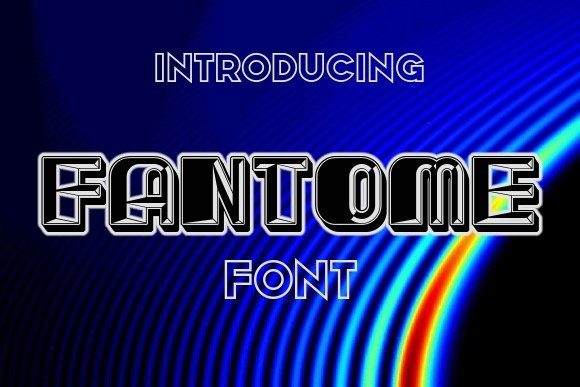
Selecting the right typography is rarely just about picking a style that looks "cool." It is a strategic decision that impacts readability, brand perception, and user experience. Fantome has gained significant traction in the design community recently. Described as a cool, trendy, and outlined display font, it offers a distinct aesthetic that can truly inspire your work. However, its specific characteristics mean it is not a one-size-fits-all solution. For beginners and seasoned professionals alike, understanding the nuances of this typeface is essential to avoid common pitfalls that can undermine even the most creative projects.
Understanding the Appeal of Fantome
Fantome stands out because of its unique visual identity. As an outlined display font, it relies on negative space and structural geometry rather than solid fills to create legibility. This makes it exceptionally effective for headlines, logos, posters, and social media graphics where immediate visual impact is prioritized over dense information delivery. The "trendy" label often associated with it stems from its alignment with modern minimalist and brutalist design movements, which favor bold, graphic elements.
For entrepreneurs, marketers, and creators, Fantome provides a way to inject personality into a project without relying on complex illustrations. Its clean lines allow it to pair well with simpler sans-serif body fonts, creating a balanced hierarchy. When used correctly, it elevates a design from generic to memorable. However, the very features that make it stylish also introduce constraints that many users overlook until it is too late.
Common Mistakes When Applying Outlined Fonts
One of the most frequent errors designers make with Fantome is misjudging its scale. Because it is an outlined typeface, thin strokes can disappear or become jagged when scaled down. Many users attempt to use it for subheadings or small captions, resulting in text that is difficult to read or visually noisy. Always test your chosen font size at the actual output dimensions. If you are designing for mobile screens, Fantome may need to be significantly larger than standard body text to maintain its integrity.
Another critical oversight involves contrast and background interaction. Outlined fonts require a clear distinction between the stroke and the fill (or lack thereof). Placing Fantome over a busy background or an image with high contrast edges can cause the letters to vibrate or blend into the noise. This reduces accessibility and frustrates the viewer. To avoid this, ensure your background is either solid, heavily blurred, or sufficiently dark/light to provide a clean canvas for the outline effect.
The Legibility Trap
Readability is not merely about recognizing letters; it is about cognitive ease. Fantome is a display font, meaning it is designed for short bursts of text, not paragraphs. Using it for long-form content, such as blog posts or article bodies, will lead to reader fatigue. Users may perceive the content as unprofessional or hard to digest. Instead, reserve Fantome for titles, pull quotes, or key messaging points. Use a highly readable sans-serif or serif font for the supporting text. This approach maintains the trendy aesthetic while ensuring your message is communicated effectively.
Evaluating Licensing and Usage Rights
Before downloading or purchasing Fantome, it is imperative to verify the licensing terms. Many trendy fonts found online come with ambiguous licenses. Some may be free for personal use only, requiring a commercial license for any project involving revenue generation, including client work, marketing materials, or merchandise. Assuming a font is free to use everywhere can lead to legal issues and unexpected costs later.
Check the following details carefully:
- Commercial vs. Personal Use: Determine if your project generates income or promotes a business.
- Embedding Rights: If you plan to use the font in web pages (via @font-face) or PDFs, ensure the license permits embedding.
- Modification Rights: Some licenses prohibit altering the font files, which might limit your ability to adjust spacing or weight.
By clarifying these points upfront, you protect your intellectual property and avoid potential takedown notices or fines. Reputable marketplaces usually provide clear documentation, but always read the fine print.
Technical Considerations for Implementation
When integrating Fantome into digital designs, file format matters. For web use, consider using SVG (Scalable Vector Graphics) for static text elements if CSS font rendering proves inconsistent across browsers. While web fonts (WOFF/WOFF2) are standard, outlined fonts can sometimes render differently depending on the operating system’s font engine. Testing across Chrome, Safari, Firefox, and Edge is crucial to ensure the outline thickness remains consistent.
For print projects, resolution is key. Ensure your design files are set to at least 300 DPI. Low-resolution outlines can appear pixelated or aliased, detracting from the polished look that Fantome aims to provide. Additionally, consider the physical medium. On glossy paper, the outline effect might reflect light differently than on matte surfaces, affecting legibility. Always request a proof print before finalizing large-scale productions like billboards or banners.
Pairing Strategies for Maximum Impact
To maximize the effectiveness of Fantome, pair it with complementary typefaces. Since Fantome is bold and graphic, it pairs well with neutral, understated fonts. A simple geometric sans-serif can ground the design, allowing Fantome to shine as the focal point. Avoid pairing it with other decorative or script fonts, as this creates visual competition and confuses the hierarchy. The goal is balance: let Fantome handle the style, and let the secondary font handle the substance.
Final Checklist Before Launching Your Design
Before finalizing any project featuring Fantome, run through this practical checklist to ensure quality and compliance:
- Legibility Test: Can you read the text clearly at the intended viewing distance?
- Contrast Check: Does the outline stand out against the background?
- Licensing Verification: Do you have the right to use this font for this specific purpose?
- Responsive Review: How does the font behave on smaller screens?
- Print Proof: Has a physical sample been checked for ink spread or resolution issues?
Fantome is a powerful tool in the designer’s arsenal, capable of adding a layer of sophistication and trend-awareness to any project. By avoiding common mistakes related to scale, contrast, and licensing, you can harness its full potential. Remember that good design is not just about looking good; it is about communicating clearly and ethically. With careful planning and attention to detail, Fantome can help you create work that is not only visually striking but also functionally sound.