Latilla: A Bold Display Font for Uniquely Designed Creations
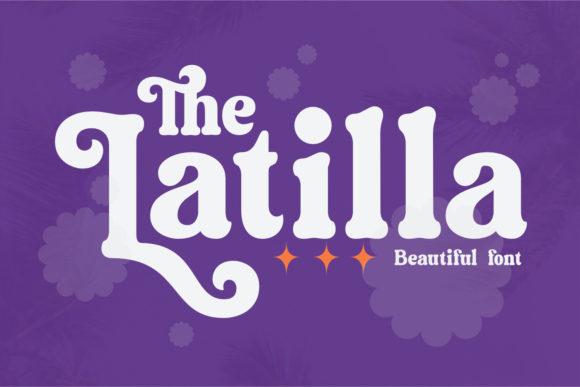
In the crowded landscape of digital design, standing out requires more than just a good idea; it requires a visual language that commands attention immediately. Typography is often the first point of contact between a brand and its audience, acting as the silent ambassador of tone, personality, and intent. Among the vast array of typefaces available to modern creators, Latilla emerges not merely as a font, but as a statement piece. It is a bold and uniquely designed display font that brings a distinct character to any project, offering designers and hobbyists alike a tool that is both striking and versatile.
What makes Latilla particularly interesting is its structural confidence. Unlike standard sans-serifs or serifs that strive for invisibility to let content speak, Latilla demands to be seen. Its forms are exaggerated yet balanced, creating a rhythm that guides the eye across headlines, posters, and web headers with effortless authority. For those looking to add a layer of sophistication and edge to their work, understanding how to leverage this specific typeface can transform ordinary layouts into memorable experiences.
The Power of PUA Encoding: Accessing the Full Spectrum
One of the most significant technical advantages of Latilla lies in its encoding method. The font is PUA encoded, which stands for Private Use Area. In simpler terms, this means that all the special glyphs, swashes, and alternative characters are mapped directly into the font file itself rather than relying on complex OpenType features that some older software might struggle to interpret.
For the designer, this translates to ease of use and reliability. You do not need to hunt through obscure menus or worry about whether your client’s computer has the latest version of Adobe Illustrator installed to see the full effect. Instead, you can access these unique elements with ease by simply typing or selecting them from the glyph panel. This accessibility lowers the barrier to entry for creative experimentation, allowing you to focus on composition rather than troubleshooting technical glitches.
- Simplified Workflow: No need for advanced typography plugins or scripts.
- Consistent Rendering: The swashes appear exactly as intended across different platforms.
- Full Glyph Access: Every decorative variation is at your fingertips.
This straightforward access encourages risk-taking. When adding flair to a design feels like a simple click rather than a complex process, you are more likely to incorporate those finishing touches that elevate a project from "good" to "professional."
Creative Applications and Design Contexts
Latilla is not a body text font. Attempting to set long paragraphs in Latilla would result in visual fatigue and poor readability. Instead, its strength lies in its role as a display font. It is designed for short bursts of text where impact is paramount. Here is how various professionals can adapt Latilla for different goals and audiences.
Branding and Identity
For small business owners and entrepreneurs, establishing a memorable brand identity is crucial. Latilla works exceptionally well for logo concepts, especially for brands in the fashion, lifestyle, music, or artisanal sectors. The bold strokes and unique letterforms can convey luxury, rebellion, or creativity depending on the context. Imagine a boutique coffee shop using Latilla for its menu board, or a freelance photographer using it for their portfolio header. The font adds an immediate layer of personality that generic fonts cannot match.
To keep results clear and effective, pair Latilla with a clean, minimalist background. Let the font breathe. Avoid cluttering the space with competing graphics. The goal is to let the uniqueness of the typeface shine without distraction.
Digital Marketing and Social Media
In the fast-scrolling world of social media, you have less than a second to capture attention. Marketers and bloggers can utilize Latilla for eye-catching quotes, promotional banners, and event announcements. The font’s high contrast and distinctive shapes ensure that your message stops the thumb from scrolling.
Consider using Latilla for key words within a sentence rather than the entire phrase. For example, if you are writing a blog post about "Creative Inspiration," you might set the word "Inspiration" in Latilla while keeping the rest of the text in a neutral sans-serif. This technique creates visual hierarchy and draws the reader’s eye to the most important part of your message.
Print and Editorial Design
For educators, publishers, and hobbyists involved in print media, Latilla offers a tactile quality that translates beautifully to paper. Whether you are designing a zine, a workshop flyer, or a limited-edition poster, the font’s bold nature holds up well against high-resolution printing processes. The swashes and alternate glyphs can be used to create custom monograms or initial caps, adding a hand-crafted feel to mass-produced materials.
Practical Tips for Using Latilla Effectively
While Latilla is powerful, it requires careful handling to avoid common design pitfalls. Here are some practical recommendations to ensure your creations remain organized, consistent, and audience-friendly.
- Maintain Readability: Always prioritize legibility. If your audience struggles to read your headline, the aesthetic appeal becomes irrelevant. Test your designs at various sizes to ensure the unique details of Latilla remain visible.
- Limit Color Palettes: Because Latilla is visually heavy, it pairs best with simple color schemes. Stick to two or three colors maximum. High-contrast combinations, such as black text on white backgrounds or neon accents on dark modes, tend to work best.
- Use White Space Generously: Give the letters room to expand. Crowding Latilla with other elements diminishes its impact. Ample padding around the text allows the bold forms to command the space effectively.
- Experiment with Swashes: Don’t be afraid to use the PUA-encoded swashes. These decorative elements can add a touch of elegance or whimsy that distinguishes your work from competitors. However, use them sparingly; too many swashes can look chaotic.
Adapting to Different Platforms and Formats
The versatility of Latilla extends beyond static images. Freelancers and digital creators can integrate this font into video intros, podcast cover art, and even presentation slides. In presentations, for instance, using Latilla for slide titles can help break the monotony of bullet points and re-engage the audience.
When adapting Latilla for digital screens, consider resolution and scaling. Ensure that your vector files are properly exported to maintain crisp edges at different screen densities. For web use, while Latilla is primarily a display font, it can be used via CSS for hero sections or call-to-action buttons, provided you have the proper licensing and file formats (such as WOFF2) to support the custom glyphs.
Conclusion: Adding Confidence to Your Creativity
Ultimately, the value of a font like Latilla lies in its ability to inspire confidence. It is a tool that empowers creators to take bold risks and express themselves without hesitation. By understanding its technical strengths, such as PUA encoding, and applying practical design principles, you can unlock new levels of creativity in your projects.
Add Latilla confidently to your favorite creations. Whether you are designing a logo, a social media campaign, or a personal blog, let yourself be amazed by the outcome generated. The right typeface does more than convey information; it sets the mood, defines the brand, and connects with the human element of design. With Latilla, that connection is made instantly, boldly, and memorably.